Sharing wealth one developer at a time!

Changing the Location of Your ITunes Library Via C#

iTunes is my least favorite software when it comes to managing music library. However sometimes you have no choice and have to deal with it. Couple times in the past I had to completely recreate my iTunes library from scratch since I could not move it to the newly installed system. Recently when I've build a new PC I was a bit smarter and did the research and mapped my library to the exact same folder and everything worked and everything transferred perfect.

This time however I've decided to move out my music library from home server to the media server and was stuck since all my music library tracks were mapped to the UNC \hpserver and new location of my music would be something like M:\Music. Unfortunately you can't do that with iTunes and you are stuck with going one by one and relocation your track.

Luckily few days ago I've stumbled across Scott Hanselman's post on how to remove dead tracks from iTunes. After looking at the code it was pretty easy to add functionality to relocate tracks automatically and I've modified the sample project he provided to do just that. Thanks to him for bringing iTunes api to light!
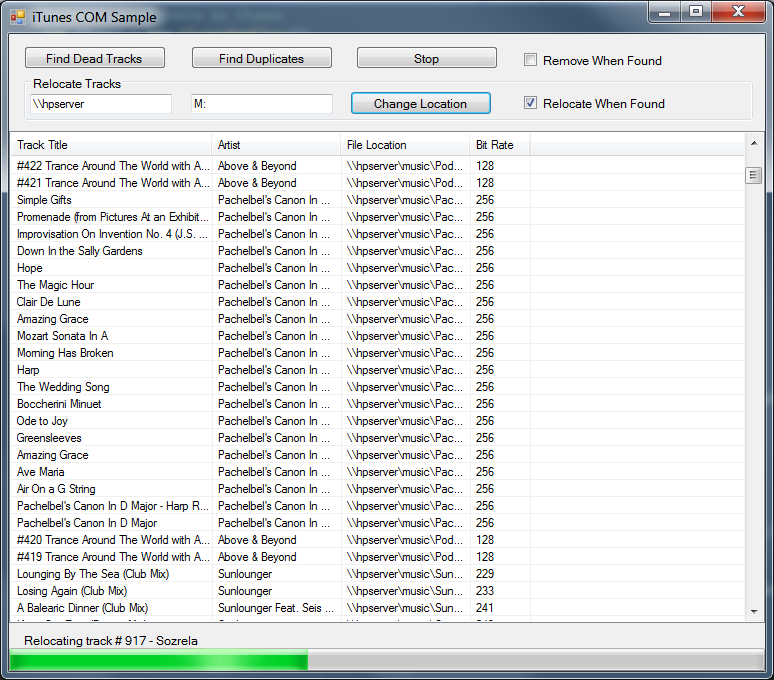
Itunes relocate tracks

Now I still have my library with play counts and all the data just like it was before but under a new location!

Here is the link to the modified source code if you ever want to move your itunes library to a new location.

itunes
Posted by: Sergey Maskalik
Last revised: 11 Feb, 2013 07:25 PM

Comments

B
B
24 Dec, 2012 08:35 AM

iTunes does support relocating your library in two steps: 1. Export the index from the default location to the location where your library is 2. Hold down Alt (on Windows) or Command (on Mac) when you start iTunes and it will prompt for the iTunes library (i.e. the iTunes index file) to load.

Not many people know about it because Apple doesn't make it obvious, but the feature is there.

07 Jan, 2013 07:38 PM

Hi B, What you have described will only get your library file to a new location but won't change individual track location. So your library file will be under a new location but if you change hard drives for your songs it would still reference the old location.

Sergey

Pierre
Pierre
03 Apr, 2013 11:39 PM

Hello Sergey,

I have tried your code and I cant get it to work. it seems that when the file has moved, and iTunes doesn't see it anymore, the fileTrack.Location is empty.

Any Idea? Thanks

Pierre
Pierre
04 Apr, 2013 03:17 PM

Hello,

To answer my own question, in the hopes that it will help others. The files have to exist in both locations for this to work.

So :

  1. Copy (do not move) your media files to the new location
  2. Use ItunesManager to update the location in your iTunes library
  3. Remove media files from old location

That's It.

Thanks Sergey for this tool!

Your Comments

Used for your gravatar. Not required. Will not be public.
What colour is grass?
Posting code? Indent it by four spaces to make it look nice. Learn more about Markdown.

Preview